iPad Mounting Ideas: 7 Best Tips You will Love
iPad mounting ideas made simple: 7 best tips to plan clean power, stable mounting, better height, and the right mount style for dashboards, signage, and kiosks.

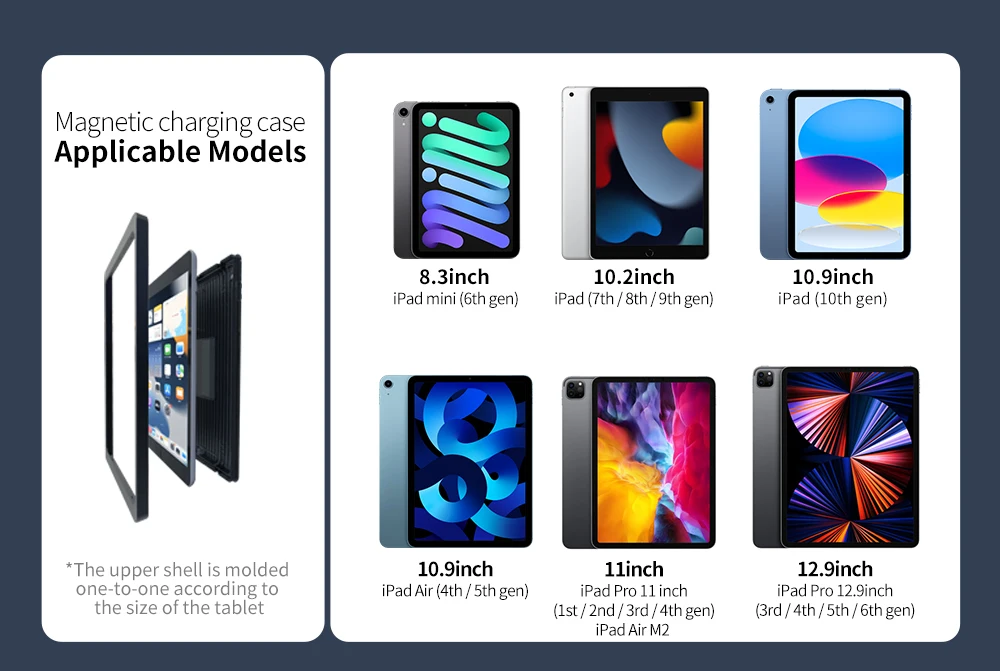
iPad mounting ideas can turn a regular iPad into a clean wall display, a stable desk screen, or a secure kiosk—without cable mess or constant battery stress. The difference between an iPad that looks “built‑in” and one that looks improvised usually comes down to a few practical choices: placement, power, stability, and fit.
Below are 7 best tips for planning iPad mounting ideas at home or in business spaces—using simple rules that work with fixed frames, magnetic docks, anti‑theft wall mounts, and desk stands.
Tip 1: Pick the iPad’s “Home” First
The best iPad mounting ideas start with one decision: where does the iPad live most of the time?
Common “homes” that work well:
- Kitchen / hallway for smart home dashboards
- Meeting room corridor for scheduling displays
- Reception / counter for check‑in or POS
- Desk for a second screen, notes, or video calls
Once your iPad has a home, everything else becomes easier—especially cable routing, viewing angle, and long‑term consistency.
Tip 2: iPad Wall Mount Ideas — Choose Fixed vs Dock‑and‑Go
There are two wall styles that look clean and work well:
- Fixed iPad wall mount ideas (frames or locked mounts)
Best when the iPad should stay in place all day—signage, room scheduling, kiosks, permanent dashboards. - Dock‑and‑go iPad wall mount ideas (magnetic docking)
Best when you want the iPad to look built‑in but still remove it quickly for handheld use.
If you want to explore EMONITA wall mounting options, start here:
https://www.emonita.net/products/
Tip 3: iPad Desk Mount — Create a Clean Second‑Screen Station
A desk setup is one of the most practical iPad mounting ideas for daily productivity.
A good iPad desk mount approach includes:
- A stable stand that doesn’t slide during taps
- A comfortable viewing height beside your laptop
- Clean cable routing so the desk stays tidy
If you use your iPad for calls, notes, reference, or creative work, a desk mount makes the iPad feel like part of your workstation instead of a device lying flat on the table.
Tip 4: Make Power Part of the Plan (Not an Afterthought)
Many iPad mounting ideas fail visually because power is ignored until the end—then a cable hangs down the wall.
For cleaner results:
- On walls, use mounts that support hidden wiring (junction box / behind‑the‑wall routing).
- On desks, route charging behind the stand so it stays out of sight.
- Reduce daily unplug/plug cycles to protect the iPad’s port.
If you want clean, always‑charging wall setups, here are two EMONITA examples:
- ClipDock wall mount with built‑in charging:
https://www.emonita.net/product/ipad-wall-mount-with-charger/ - Fixed frame with built‑in fast charging:
https://www.emonita.net/product/fixed-ipad-wall-mount-fast-charging/
Tip 5: Mount Height Matters More Than People Think
With iPad mounting ideas, wrong height is the fastest way to create a setup people avoid.
General guidance:
- Touch‑heavy dashboards / kiosks: slightly below eye level
- Room scheduling panels: eye level in the corridor
- Signage: based on viewing distance (higher if meant to be read from afar)
Before drilling, stand where the user will stand and “air tap” the spot. If it feels awkward now, it will feel worse after installation.
Tip 6: iPad Mounting Tips — Confirm Fit and Access Before Tightening
Before you fully lock down any iPad mounting ideas, test these basics:
- Buttons can be pressed comfortably
- Camera is not blocked (important for calls and scanning)
- Speakers are not covered
- Ports remain accessible as intended
Also confirm the iPad model. Apple’s official identification page is the fastest way to avoid ordering the wrong size:
https://support.apple.com/en-us/HT201471
This is one of the most overlooked iPad mounting tips, and it saves time, returns, and frustration.
Tip 7: Smart Home iPad Mount + Business Use Cases
The smartest iPad mounting ideas match the mount style to the job.
Smart home iPad mount uses
A smart home iPad mount works best when it’s always powered and placed where people naturally stop:
- Kitchen dashboard for scenes and timers
- Hallway panel for lights and cameras
- Office control screen for meetings and automation
Business uses
- Digital signage and menus (fixed, clean front view)
- POS and check‑in (security + reliable charging)
- Conference scheduling (consistent visibility outside meeting rooms)
Choose the use case first, then pick the mount that supports it. Your installation will stay “right” for months, not just on day one.
Quick Checklist
- Pick the iPad’s main location (desk, wall, counter)
- Decide fixed vs removable docking
- Plan hidden power from the start
- Choose a comfortable, realistic mount height
- Ensure stability under tapping and swiping
- Confirm full access (camera/buttons/speakers/ports)
- Match the mount to the real use case
Helpful Links
- Identify your iPad model (Apple):
https://support.apple.com/en-us/HT201471 - Explore EMONITA products (internal):
https://www.emonita.net/products/
Watch & Follow EMONITA
- Website: https://www.emonita.net
- YouTube channel 1: https://www.youtube.com/@emonita01
- YouTube channel 2 (Lucky Wang): https://www.youtube.com/@LuckyWang-n2s
- TikTok main: https://www.tiktok.com/@emonita.net
- TikTok secondary: https://www.tiktok.com/@emonita_1
- Instagram: https://www.instagram.com/emonita02/
- Facebook page: https://www.facebook.com/profile.php?id=61584081074439
- Facebook: https://www.facebook.com/emonita.net/
- Facebook Business: https://business.facebook.com/latest/home?business_id=906862885841440&asset_id=893724547155274
- X (Twitter): https://x.com/emonita00
- WhatsApp / WeChat: +8618959199691