iPad POS Stand: Ultimate Secure Checkout Setup


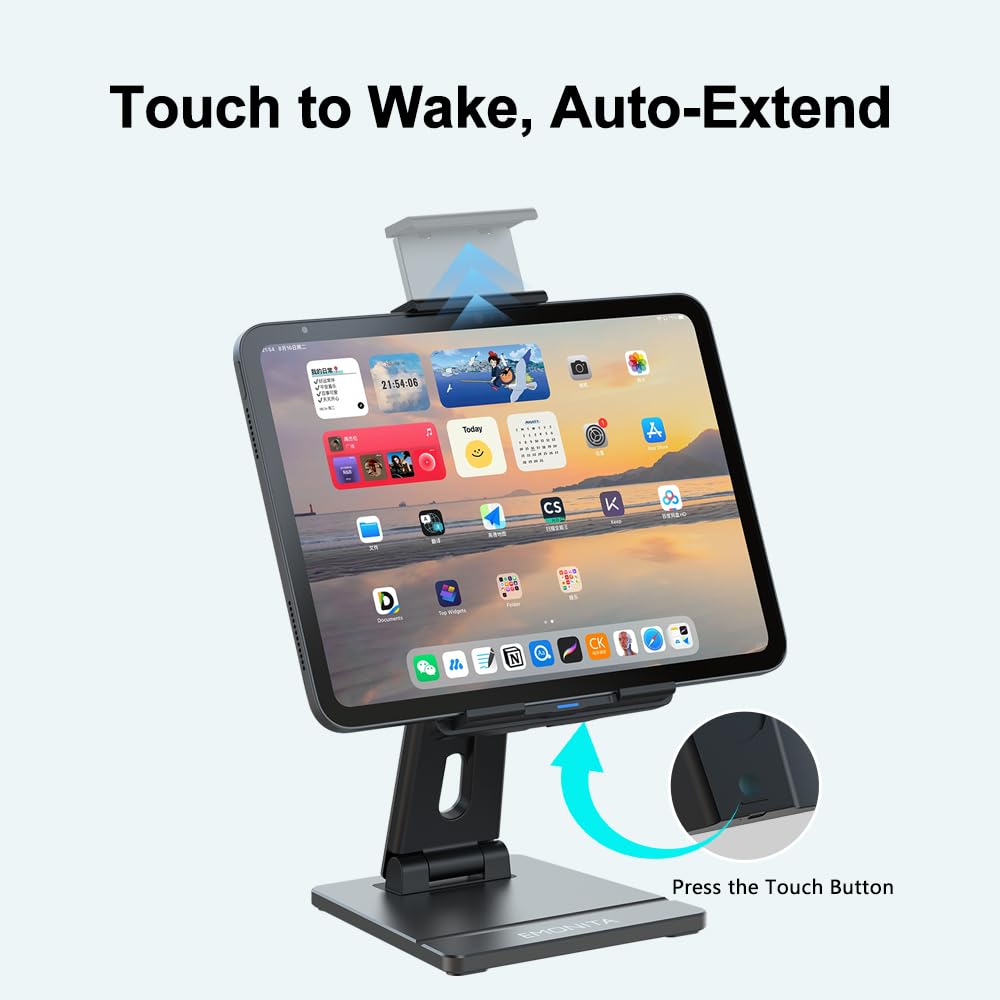

iPad POS Stand setups help you run faster checkout with a cleaner counter and a steadier screen. When the iPad stays stable for taps, signatures, and customer interactions, your POS workflow feels smoother and more professional. ⚡
Busy stores, cafés, salons, clinics, and front desks benefit most because a reliable iPad POS Stand reduces wobble, prevents accidents, and keeps charging simple and tidy. ✨
Why An iPad POS Stand Matters At Checkout 🧠💳
A checkout iPad gets used constantly, so the stand is not an extra, it is part of the workflow.
A well chosen iPad POS Stand improves speed and confidence at the counter because the screen stays in place and the setup looks consistent to customers.
Key benefits you will notice quickly
- Stable screen for fast tapping and signature capture ✅
- Reduced drop and damage risk during busy hours 🔒
- Better customer trust with a tidy POS look ✨
- Cleaner cable routing so the counter stays uncluttered 🧼
If your iPad slides around or runs low on battery mid shift, checkout always feels slower than it should.
iPad POS Stand Features For A Secure Checkout Counter Stand ✅⚡
To build a reliable station, focus on performance features, not just appearance.
These features are what turn a basic holder into a Secure Checkout Counter Stand
- Secure holding pressure that prevents slips during swipes and customer signing 🔒
- Fast dock and release that saves time for staff workflows 👆
- Angle and height adjustment that improves comfort and visibility 👀
- Stable base weight that reduces wobble during tapping or stylus use 💪
- Cable management that protects the charging cable from being pulled or bent 🧼
A strong Secure Checkout Counter Stand is not only about looks, it directly improves daily checkout stability and speed.
EMONITA Electric Tablet Stand (Fast, Hands Free, Secure) 🤖🔒
For a busy counter, the EMONITA Electric Tablet Stand is a strong option because it uses an intelligent sensor that auto clamps the device.
Place the iPad in the holder and it grips evenly. When you are done, it opens just enough for smooth removal. ✅
Why it fits an iPad POS Stand workflow
- Supports tablets from 8 to 14 inches
- Auto clamping reduces handling time at checkout 👆
- Motor rated for 80,000+ cycles for heavy daily use 💪
- Thick aluminum base helps prevent tipping
Internal links (EMONITA)
Image suggestion
Insert a counter photo showing the stand holding an iPad.
Image Alt Text should be iPad POS Stand.
Magnetic iPad Stand 45W (Clean Counter Charging) 🧲⚡
If staff often lifts the iPad for quick tasks, a magnetic desk solution can feel smoother than plugging and unplugging a cable repeatedly.
The Magnetic iPad Stand 45W supports a clean dock and lift workflow and helps keep the counter tidy. ✨
Internal link
This style can also reduce wear on the iPad charging port because the device docks instead of being constantly reconnected by cable. ✅
Image suggestion
Insert a desk or counter photo that shows tidy cable routing.
Image Alt Text should be iPad POS Stand.
Checkout Setup Tips That Make A Big Difference 🧾✅
Small adjustments can make your iPad POS Stand station look and feel premium from day one.
Use these practical tips
- Place the stand at a comfortable signing height so customers do not bend too low 👆
- Route power behind the stand, not across the counter, to avoid cable pulls 🧼
- Use a reliable power adapter because weak adapters cause charging complaints 🔌
- Keep the screen angle stable if you capture signatures frequently ✍️
- If the iPad is customer facing, position it to reduce shoulder surfing 👀
These steps reduce friction for staff and customers immediately.
POS Software References (External Links) 🌐💳
If you are building or upgrading a checkout station, these official resources help you understand common POS workflows
When An iPad Wall Mount With Power Is A Better Choice 🔌🧱
An iPad POS Stand is best for counters, but some businesses get better results with an iPad Wall Mount With Power, especially when the counter must stay clear or the tablet should be fixed in one location.
A wall solution is often better when
- The counter is small and must stay clear 🧼
- The iPad is used for check in, queue display, or booking 👥
- You want a fixed location to reduce device movement 🔒
- You want hidden wiring for a cleaner wall finish ✨
EMONITA wall options (internal links)
This comparison helps customers choose the right format for their space, which reduces returns and improves satisfaction.
Confirm Your iPad Model Before Buying 🍎✅
Before purchasing any stand or mount, confirm your iPad model to avoid sizing mistakes
Follow EMONITA 📣🌐
- Website 🌐
- YouTube ▶️ (@emonita01)
- YouTube ▶️ (@Emonita001)
- TikTok 🎵 (@emonita.net)
- TikTok 🎵 (@emonita_1)
- Facebook 📘 (Profile)
- Facebook 📘 (Page)
- Facebook Business 📊
- Instagram 📸 (@emonita02)
- X (Twitter) 𝕏 (@emonita00)
Contact EMONITA 📩📞
One comment
Comments are closed.
I read a few reviews before joining and they were all right. The experience is premium and the games load quickly without any lag. Love it.