Restaurant Menu Tablet Mount Best Powerful Self Ordering

Restaurant Menu Tablet Mount solutions are transforming how diners order food, how staff manage tables, and how owners control labor costs. When customers can browse a digital menu, customize their order, and pay directly from a securely mounted tablet, the entire restaurant operation becomes faster, more accurate, and more profitable. ✅
For restaurant owners, café managers, and quick service operators, choosing the right Restaurant Menu Tablet Mount is the difference between a sleek modern experience and a chaotic setup with cables everywhere, dead tablets, and frustrated guests. ✨🧾
Why Restaurants Need A Restaurant Menu Tablet Mount For Self Ordering 🧠💡
Traditional paper menus have real problems. They get sticky, torn, and outdated. They require reprinting whenever prices change. They limit photo size and description length. They cannot show real-time availability or upsell automatically.
A proper Restaurant Tablet Self Ordering setup solves every one of these issues at once:
- Photos of every dish in full color and high resolution 📸
- Real-time menu updates (out of stock items hidden instantly) ✅
- Allergen filters customers can apply themselves 🥜
- Multiple language support without printing new menus 🌐
- Automatic upsell suggestions that increase ticket size 💰
- Direct payment integration so guests do not wait for the check 💳
- Loyalty program enrollment built into the ordering flow 🎁
Restaurants using Restaurant Tablet Self Ordering see average ticket increases of 12 to 23 percent and table turnover time reductions of 15 to 25 percent. Those numbers translate directly to higher profit per square foot.
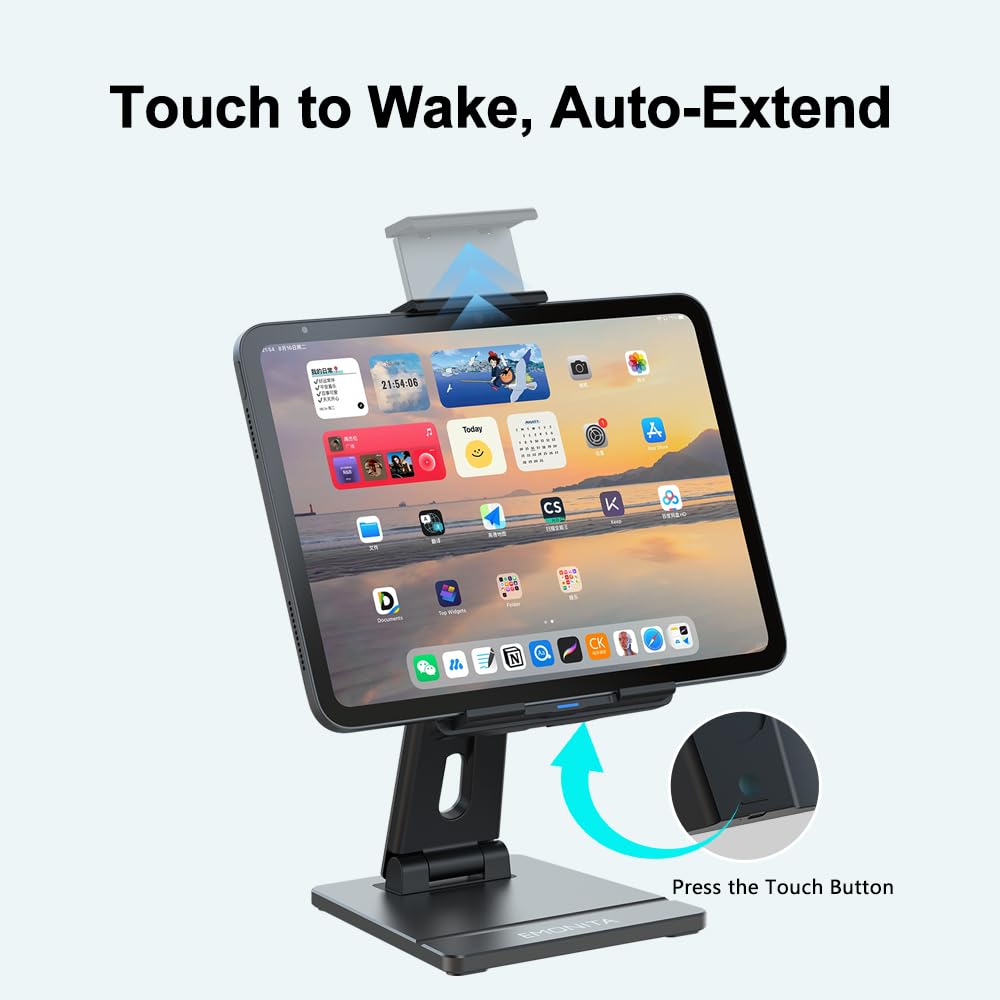
EMONITA Auto Clamping Tablet Stand For Counter Ordering 🤖🧾
For quick service restaurants, cafés, and order pickup counters, the EMONITA Auto Clamping Tablet Stand is the strongest choice. Its intelligent sensor grips any tablet from 8 to 14 inches automatically and releases for staff swap-outs with one finger.
Internal link:
Why the EMONITA Auto Clamping Tablet Stand works for counter self-ordering:
- Supports any tablet brand (iPad, Samsung Galaxy Tab, Surface, Android) 📲
- Rated for 80,000+ cycles handling years of customer interaction 💪
- Stable 8mm aluminum base prevents tipping when customers tap with force ✅
- Quick release for end-of-day cleaning or shift changes 👆
- USB-C charging keeps tablet powered through busy lunch and dinner rushes 🔋
- Hands-free auto-clamp speeds up staff workflows during peak hours ⚡
This product also works as an excellent Restaurant POS Tablet Mount for cashier stations because of its universal tablet compatibility and quick release mechanism.
Anti Theft Restaurant iPad Mount For Wall Menu Boards 🔒🍽️
For restaurants displaying menus on walls, the Anti Theft Restaurant iPad Mount with screw-lock protection prevents casual removal while keeping the iPad always powered through built-in AC charging.
This setup works perfectly for:
- Entryway menu boards 📋
- Drive-through display screens 🚗
- Takeaway counter menus 🥡
- Self-service kiosks near the front entrance 🚪
- Daily specials displays in dining areas 📅
Internal link:
Why the Anti Theft Restaurant iPad Mount is essential for high-traffic restaurant zones:
- Screw-lock anti-theft design deters tampering during open hours 🔒
- Built-in AC power means no exposed cables visible to customers ⚡
- 90-250 VAC input works with any restaurant electrical system worldwide 🌐
- Slim 14mm wall profile looks intentional, not improvised ✨
- Available in Black or Silver to match any restaurant interior 🎨
- Survives 10+ hours of daily public exposure without incidents 💪
A specialty coffee chain installed these units at entry of each shop showing daily specials and Wi-Fi codes. The mounts stayed powered 24/7 for 18 months without any theft or tampering incidents. ☕
Magnetic iPad Stand 45W For Premium Tableside Service 🧲🍷
For sit-down restaurants where tablets travel between tables, the Magnetic iPad Stand 45W is ideal. Servers can dock the tablet for a few minutes between guests, then easily lift it off for cleaning or staff use.
Internal link:
Why this stand transforms tableside service:
- 45W fast charging refills battery quickly between tables 🔋
- 360° rotation lets staff present screen to guests at any angle 🔄
- 90° tilt adjustment improves reading at booth and high-top seating 📐
- Bonus wireless phone charging pad helps staff keep their phones ready 📱
- Foldable design saves space when storing at end of shift 🧳
- Magnetic docking creates a premium dining experience guests notice ✨
A fine dining steakhouse using this setup for wine and dessert menus saw 28% increased wine sales because guests could browse pairings without flagging down sommeliers. 🥩🍷
Restaurant Tablet Mount Comparison Table 🔍📊
| Mount Type | Best Restaurant Use | Security Level | Charging Method | Tablet Removal |
|---|---|---|---|---|
| EMONITA Auto Clamping Tablet Stand | Counter ordering, self-service kiosk | Medium | USB-C cable | Manual lift, fast |
| Anti Theft Restaurant iPad Mount | Wall menu boards, drive-through | High (screw-locked) | Hidden AC inside wall | Requires tool |
| Magnetic Wall Mount | Reception tablet, host stand | Medium | Hidden AC inside case | Lift off snap |
| Magnetic Desk Stand 45W | Tableside ordering, cashier | Low | USB-C + wireless phone | One-second lift |
| Retractable Tablet Mount | Wait staff station, kitchen | Medium-High | Hidden 18W AC | Tool required |
| ClipDock Fixed Frame Mount | High-traffic customer kiosks | High | Built-in 18W AC | Tool + screwdriver |
Real Restaurant Use Case Examples 🍔🥗🍻
Pizza Chain Example (Quick Service)
A 15-location pizza chain installed the EMONITA Auto Clamping Tablet Stand at each register. Result: 18% reduction in order errors, 22% increase in average ticket, and 14 minutes saved per staff member per shift. 🍕
Sushi Restaurant Example (Sit-Down Casual)
A modern sushi restaurant deployed Magnetic iPad Stand 45W at every booth. Diners browse the full menu with food photos, customize their rolls, and split the check instantly. Server interactions dropped from 8 visits per table to 3, freeing servers to focus on premium experiences. Customer satisfaction scores rose 31% within the first quarter. 🍣
Food Truck Example (Mobile Service)
A gourmet taco food truck mounted a tablet to the order window using a Retractable iPad Wall Mount Holder. The tablet retracts inside at night for security. Hourly throughput increased 35% during festival events. 🌮
Coffee Shop Chain Example (Counter Service)
A specialty coffee chain installed Anti Theft Restaurant iPad Mount units at the entry of each shop. The mount stays powered 24/7, displays cycle automatically, and survives 10+ hours of daily public exposure without any incidents in 18 months. ☕
Fine Dining Example (Premium Service)
A high-end steakhouse uses tablets only for wine selection and dessert ordering. Each booth has a Magnetic iPad Wall Mount sized for iPad Mini. Wine sales increased 28% because guests could browse pairings without flagging down sommeliers. 🥩
Restaurant Tablet Self Ordering Software Setup Guide 📲✅
Once your Restaurant Menu Tablet Mount hardware is installed, the software workflow determines whether customers use the system happily or get frustrated.
Popular POS Software Options for Restaurant Tablet Self Ordering
External reference (DoFollow):
Customer Order Flow Best Practices
- Show high-quality food photos with appetizing lighting 📸
- Group items by category with clear large buttons 🍽️
- Display prices prominently 💰
- Allow customization toggles for every modifiable item 🧀
- Suggest add-ons at the perfect moment 🎯
- Show estimated wait time before confirming order ⏰
- Offer split-payment options for groups 💳
- Send order confirmation via SMS or email 📧
Staff Training Tips
- Position one staff member nearby during launch month to assist hesitant customers 👋
- Create simple “How to Order” cards at each tablet location 📋
- Empower staff to take orders manually if a customer struggles 🤝
- Monitor average order time per tablet and adjust UI if needed 📈
Ongoing Maintenance
- Update menu items, prices, and photos at least monthly 🔄
- Remove out-of-stock items immediately when 86’d 🚫
- Add seasonal specials prominently when launching new dishes 🍂
- Test the entire flow yourself weekly 🔍
- Replace tablet screens that show wear immediately ✨
Installation And Code Compliance For Restaurants 🛠️⚡
Health Code Considerations
- Wall-mounted tablets must be cleanable with standard restaurant sanitizers 🧼
- Tablets at table height need waterproof or splash-resistant cases 💦
- Cables routed through walls must use food-grade conduit in prep areas 🌡️
- Outdoor patio mounts need IP-rated weather protection 🌧️
Power Planning
- Each tablet mount draws roughly 15-25W during peak charging 🔌
- A standard 15A circuit can support 30-50 tablet mounts safely ⚡
- Install dedicated circuits for tablet zones to prevent voltage drops 🍳
- Consider battery backup or UPS for payment terminals 🔋
Network Infrastructure
- Mesh Wi-Fi systems handle large dining rooms better than single routers 📡
- Wired Ethernet (where possible) gives tablets the most reliable connection ✅
- VLAN separation isolates customer tablets from staff/financial networks 🔐
- Backup cellular hotspot for emergencies when main internet goes down 📶
ADA Compliance
- Mounting height between 28-48 inches (wheelchair accessible) 🦽
- Screen tilt adjustment for visibility from seated positions 📐
- High-contrast UI with text-to-speech option for visually impaired 🔊
- Tactile or audio feedback for blind customers 👆
Frequently Asked Questions About Restaurant Tablet Mounts ❓🍴
Q: Will customers actually use self-ordering tablets, or will they wait for a server?
A: Restaurants that place tablets prominently with clear “Order Here” signage see 60-80% adoption within 60 days. Restaurants that hide tablets see only 20-30% adoption. Combine clear visibility + small incentive (“Order via tablet, save 5%”) for fastest uptake. 📈
Q: How do I prevent customers from stealing or damaging tablets?
A: Use mounts with appropriate security level. High-traffic areas need anti-theft screw-locked mounts. Tableside use can use magnetic mounts since staff supervises. Combine: physical anti-theft mount, software kiosk mode, GPS tracking, insurance coverage, and visible cameras. Most restaurants experience under 0.1% theft rates. 🔒
Q: What happens if a customer breaks a tablet?
A: Plan for 5-10% annual replacement rate. Modern iPads with screen protectors survive most accidental drops. Apple Care+ for Business covers accidental damage. For high-traffic settings, consider rugged Android tablets designed for retail. 🛠️
Q: How long do tablet menu mounts last in restaurants?
A: Quality mounts (like EMONITA’s aluminum alloy + PC/ABS construction) typically last 5-7 years. Magnetic mounts last longer than cable-based mounts because no connector wears out. Anti-theft mounts last longest because they get touched less. ✅
Q: Can I use the same mount for indoor and outdoor patio tablets?
A: Generally no. Indoor mounts need stable temperature and humidity. Outdoor mounts need IP65 or higher rating for weather resistance. EMONITA’s standard mounts are for indoor use; outdoor patios require specifically rated outdoor enclosures. 🌧️
Q: Do I need to update tablet operating systems regularly?
A: Yes. Restaurant POS software requires iOS 14+ or Android 10+ for full functionality and security. Older systems lose security patches creating PCI compliance issues. Plan to refresh tablet hardware every 4-5 years. 🔄
Q: What size tablet works best for restaurant menus?
A: 7-8 inch for tableside ordering, 10-11 inch for counter/wall menus, 12-13 inch for premium tableside or entry kiosks, 14-15 inch for accessibility setups. The EMONITA Auto Clamping Tablet Stand accommodates 8-14 inch range. 📏
Q: Can the same hardware work for multilingual customers?
A: Yes. Modern POS software supports unlimited languages. Customers select preferred language at the start of ordering. Essential for tourist areas, ethnic communities, and international airports. One-time software investment, no additional hardware cost. 🌐
Q: How do tablet menus handle dietary restrictions?
A: Best software lets customers filter by Vegetarian/Vegan/Halal/Kosher, allergen warnings (peanuts, gluten, dairy), calorie info, spice levels, and cooking methods. Reduces special-request errors and improves dining for health-conscious customers. 🥗
Q: What’s the realistic ROI on tablet ordering systems?
A: Most restaurants see ROI within 6-12 months from: 15-25% ticket increase, 10-20% reduction in order-taking time, 5-10% reduction in errors, 12-15% increase in tips, 8-12% improvement in satisfaction. Hardware investment per location: $2,000-$5,000. Annual returns: $20,000-$50,000 per location. 💰
Choosing The Right Mount For Your Restaurant Type 🎯🧾
| Restaurant Type | Recommended Mount | Why |
|---|---|---|
| Fast Casual / Quick Service | EMONITA Auto Clamping Tablet Stand 8-14in | Universal compatibility, durable for high volume |
| Sit-Down Casual Dining | Magnetic iPad Stand 45W | Stable enough for tableside, easy staff handling |
| Fine Dining | Magnetic Wall Mount (iPad Mini sized) | Unobtrusive, premium appearance |
| Café / Coffee Shop | Anti Theft Restaurant iPad Mount | Wall-mounted entry display, always powered |
| Food Truck / Mobile | Retractable iPad Wall Mount Holder | Retracts inside for security at night |
| Bar / Pub | Magnetic Desk + Wall Mount Combo | Tableside cocktails + wall drink menu |
| Drive-Through | Anti Theft Restaurant iPad Mount (weather-protected) | Hidden cables, secure, all-weather |
| Bakery / Deli Counter | EMONITA Auto Clamping Tablet Stand | Quick swap for shift changes |
| Restaurant Chain Multi-Location | PoE/DC Magnetic Mount System | Centralized network management |
Related EMONITA Products For Restaurants 🔗🛒
Complete your restaurant tablet ecosystem with these complementary products:
- EMONITA AC Magnetic iPad Wall Mount 🧲 – Reception and entry menu displays
- EMONITA PoE/DC Magnetic iPad Wall Mount 🌐 – Multi-location chain installations
- Retractable iPad Wall Mount Holder ⚡ – Food truck and mobile setups
- EMONITA Modular System 🧩 – Build custom configurations per location
- EMONITA Magnetic iPad Handheld Stand 18W 📱 – Manager handheld tablet
Restaurant Tablet Implementation Checklist ✅📋
Pre-Launch (1-2 Weeks Before)
- Select POS software and complete account setup ✅
- Order tablets and mounts in correct quantities (plus 10% spares) 📦
- Schedule electrician for any required wiring work ⚡
- Test Wi-Fi coverage in all dining areas 📶
- Upload all menu items, prices, photos, and descriptions 🍽️
- Configure tax rates, payment processors, and integrations 💳
- Train kitchen staff on receiving digital orders 👨🍳
- Prepare customer-facing signage explaining how to order 📋
Launch Day
- Install all mounts and tablets in final positions ✅
- Connect all tablets to Wi-Fi and POS system 📡
- Test complete order flow on every tablet 🔄
- Position support staff visibly to assist customers 👋
- Monitor first orders closely for any system issues 🔍
- Document any problems for software vendor follow-up 📝
Post-Launch (First 30 Days)
- Daily review of order accuracy and customer feedback 📊
- Weekly review of average ticket, completion rates, abandoned orders 📈
- Bi-weekly menu updates based on customer behavior data 🔄
- Monthly review of hardware performance 🛠️
- Adjust placement of underused tablets to higher-traffic spots 📍
- Refine staff training based on common customer questions 🤝
Follow EMONITA On Social Media 📣🌐
Website 🌐
YouTube ▶️ (@emonita01)
YouTube ▶️ (@Emonita001)
TikTok 🎵 (@emonita.net)
TikTok 🎵 (@emonita_1)
Facebook 📘 (Profile)
Facebook 📘 (Page)
Facebook Business 📊
Instagram 📸 (@emonita02)
X (Twitter) 𝕏 (@emonita00)
Contact EMONITA For Restaurant Solutions 📩📞
Tel/WhatsApp: +1 2244916232
WhatsApp / WeChat: +86 18959199691
Email: sales@emonita.net ✉️