iPad Wall Mount Power Best Powerful Comparison Setup

iPad Wall Mount Power selection is one of the most important decisions you will make before installing a permanent wall tablet. Choosing the wrong power type can mean expensive rewiring later, unreliable charging, or a messy cable finish that ruins the professional look you were aiming for. ✅
This guide covers the three main power options available through EMONITA: AC (mains power), PoE (Power over Ethernet), and DC (low voltage direct current). By the end, you will know exactly which option fits your building, budget, and use case. 🧠✨
What Is AC vs PoE vs DC iPad Wall Mount Power 🧠🔍
Before comparing options, here is a simple breakdown of what each power type actually means in plain language:
AC Power (Mains Power)
AC stands for Alternating Current. This is the standard electricity that comes out of your wall socket at home or in an office. In most countries this runs at 100-240V. An AC powered iPad wall mount connects directly to this mains supply inside a junction box behind the wall. ⚡
PoE Power (Power over Ethernet)
PoE stands for Power over Ethernet. Instead of running a separate power cable, a single Ethernet (network) cable carries both internet data AND electrical power to the mount at the same time. You need a compatible PoE network switch or injector to make this work. 🌐
DC Power (Direct Current)
DC stands for Direct Current. This is low voltage power (typically 12V to 24V) supplied by a regulated DC power adapter or an AV rack power supply. It is commonly used in professional AV installations and smart building projects. 🔋
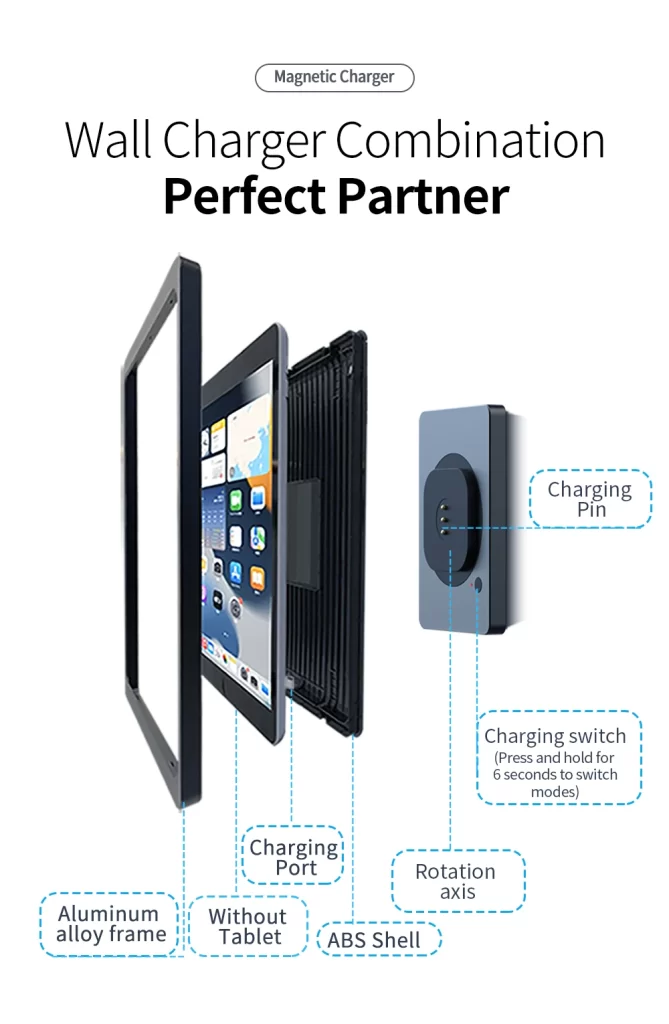
EMONITA AC Magnetic iPad Wall Mount (AC Only) 🧲⚡
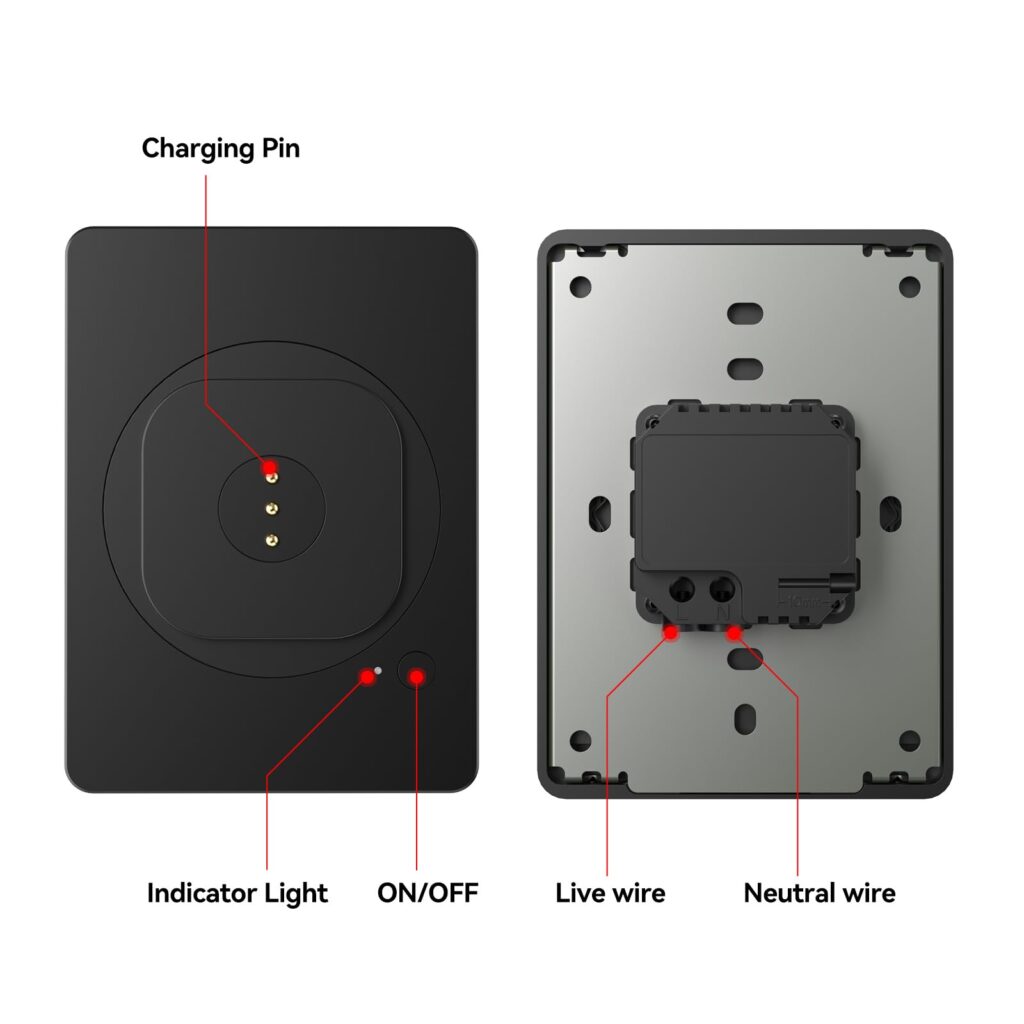
The EMONITA AC Magnetic iPad Wall Mount is specifically designed for installations where standard mains power (100-240V AC) is available at the mounting location.
Internal link:
Key features of this AC model:
- Input: AC 100–240V (works worldwide) 🌍
- Charging: Integrated 18W fast charging ⚡
- Docking: Magnetic snap-on case (size-specific) 🧲
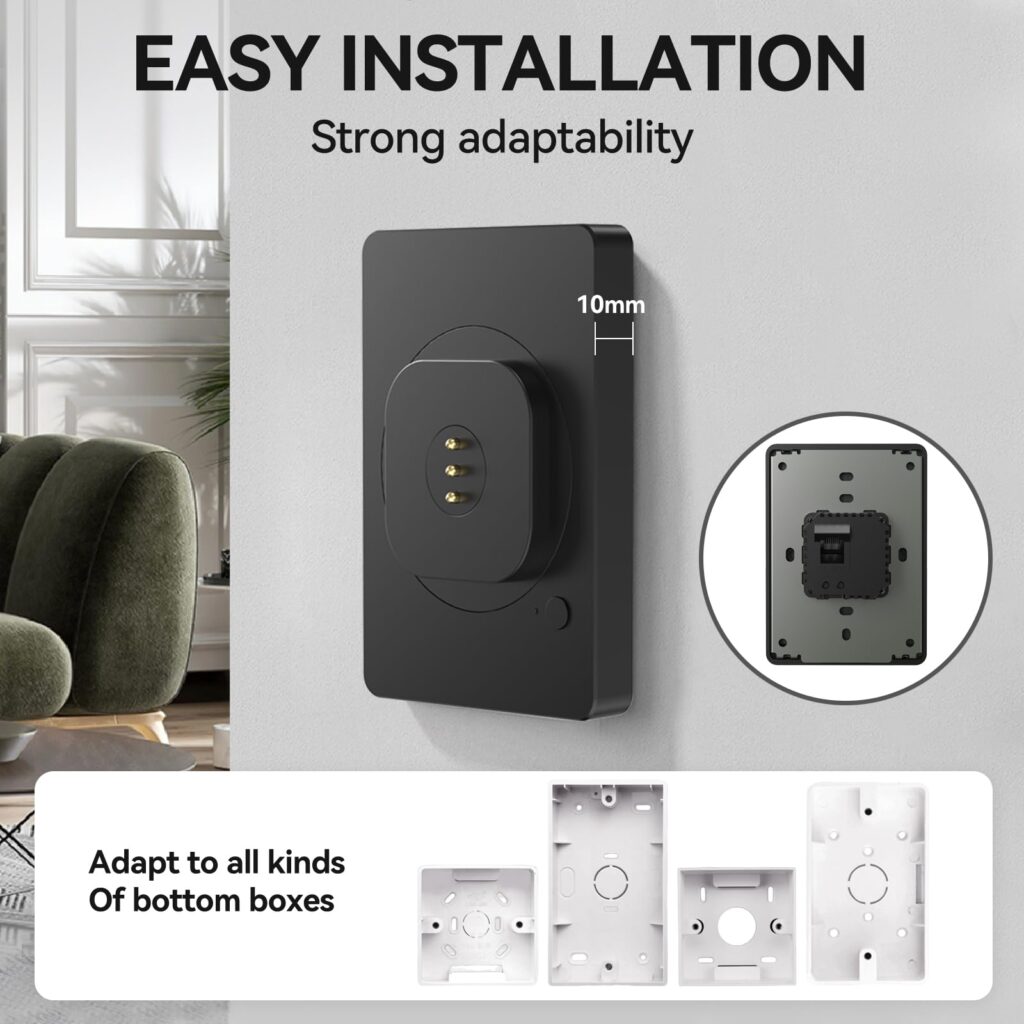
- Profile: Approximately 10mm off the wall for a flush look ✨
- Rotation: 360° portrait and landscape switching 🔄
- Modes: Auto charging or Manual charging (toggle with 6-second button hold) 🎛️
Best for:
- Homes with standard electrical outlets nearby 🏠
- Offices where AC wiring is already available 🏢
- Smart home dashboards where simplicity matters most ✅
- Installations where no network infrastructure exists near the mount 🌐
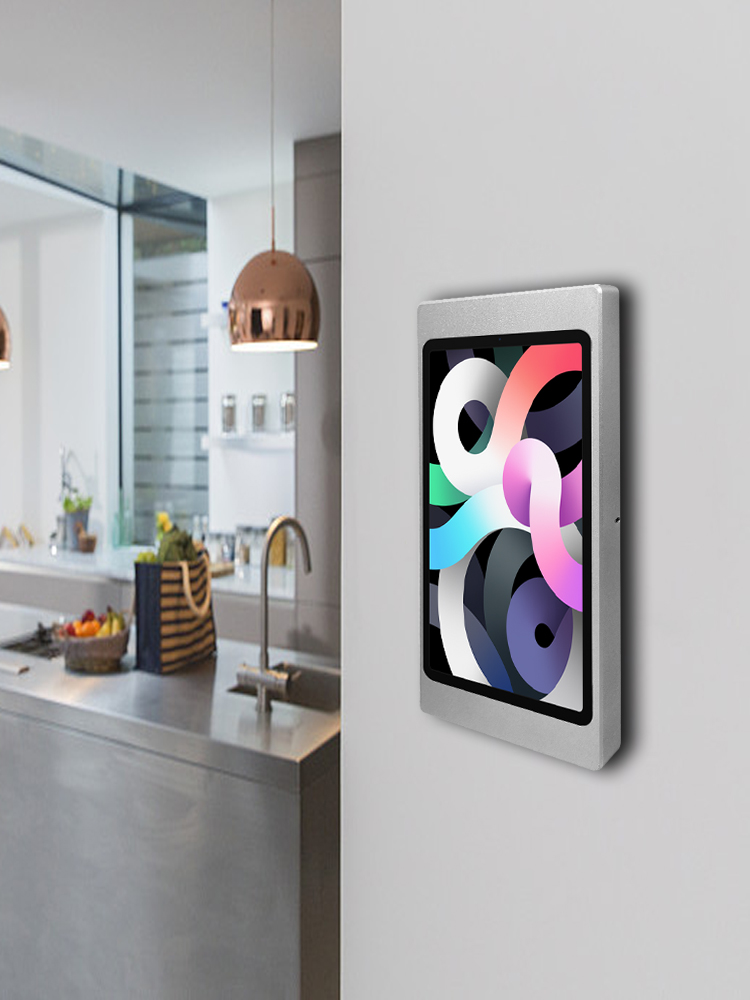
EMONITA PoE/DC Magnetic iPad Wall Mount (Dual Power) 🧲🌐
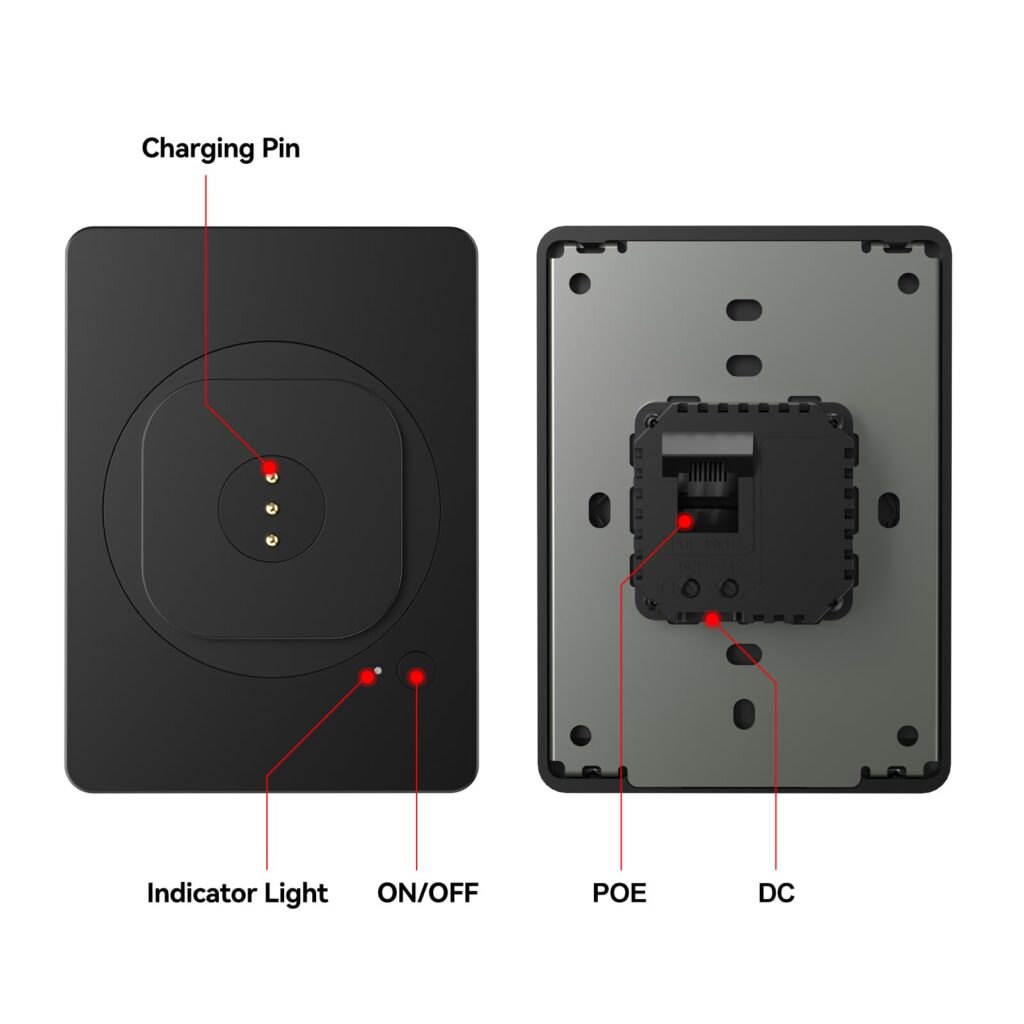
The EMONITA PoE/DC Magnetic iPad Wall Mount is a completely different model that gives you TWO power input options in ONE mount. You can choose either PoE (Ethernet-based power) OR DC (low voltage direct current) depending on what your building infrastructure supports.
Internal link:
Key features of this PoE/DC model:
- Input Option 1: PoE (compatible PoE switch or injector required) 🌐
- Input Option 2: DC 12–24V (regulated DC power supply required) 🔋
- Charging: Integrated 18W fast charging (same as AC model) ⚡
- Docking: Same magnetic snap-on case system 🧲
- Profile: Same approximately 10mm flush appearance ✨
- Rotation: Same 360° portrait and landscape switching 🔄
- Modes: Auto or Manual charging (same 6-second toggle) 🎛️
Best for:
- Hotels and commercial buildings with structured Ethernet networks 🏨
- Smart buildings where PoE switches already exist in server rooms 🏗️
- AV rack installations using centralized DC power supplies 🎛️
- Multi-location retail chains needing centralized network management 🛍️
- Projects where running AC mains near the mount location is impractical 🔌
iPad Wall Mount Power AC vs PoE vs DC Comparison Table 🔍📊
This is the most important section for making the right decision. Use this table to compare all three power options side by side:
| Factor | AC Power | PoE Power | DC Power |
|---|---|---|---|
| EMONITA Model | AC Magnetic Mount | PoE/DC Magnetic Mount | PoE/DC Magnetic Mount |
| Input Voltage | 100–240V AC | 48V (IEEE 802.3af/at) | 12–24V DC |
| Cable Type | Standard electrical wire | Single Ethernet Cat5e/Cat6 | Low voltage DC wire |
| Charging Output | 18W fast charging | 18W fast charging | 18W fast charging |
| Network Data | Separate Wi-Fi needed | Built into same cable ✅ | Separate Wi-Fi needed |
| Installation Cost | Medium (electrician needed) | Low-Medium (IT/network) | Low (AV installer) |
| Best Environment | Home, small office | Hotel, smart building, chain | AV rack, commercial AV |
| Power Source | Wall socket/junction box | PoE switch or injector | DC regulated adapter |
| Scalability | Per-location wiring | Central network management ✅ | Central rack management |
| Safety Level | High voltage (120/240V) ⚠️ | Low voltage (safe) ✅ | Low voltage (safe) ✅ |
| Price Point | Lower upfront | Higher upfront (switch cost) | Medium upfront |
Which iPad Wall Mount Power Option Is Right For You 🎯✅
Use this simple decision guide to choose the right power type for your specific iPad Wall Mount Power:
Choose AC Power if:
- You already have a standard electrical outlet or junction box near the mounting location ✅
- You are installing in a home, apartment, or small business office 🏠
- You want the simplest, most straightforward setup 🔧
- Your budget is tight and you do not need centralized network management 💰
- A licensed electrician is available for the installation ⚡
Choose PoE Power if:
- Your building already has structured Ethernet wiring (Cat5e or Cat6) 🌐
- You have a PoE-capable network switch or can add a PoE injector 🔄
- You want ONE cable to handle both power AND network data 📶
- You are deploying multiple tablets across a large building or chain location 🏗️
- You want central power monitoring and management from a server room 🖥️
- Running new AC mains wiring to the mounting location is too expensive ⚡
Choose DC Power if:
- You are working on a professional AV or smart building installation 🎛️
- You have a centralized DC power supply in an AV rack nearby 🔋
- Your project involves low-voltage specialists rather than electricians 🔧
- You need precise voltage control that a DC regulated adapter provides ✅
- You want to avoid mains-level voltage entirely for safety reasons 🛡️
Installation Overview For iPad Wall Mount Powers 🛠️🧱
AC Power Installation Steps
- Confirm junction box location and prepare 100-240V AC wiring ⚡
- Connect mains line and neutral to the AC module (licensed electrician recommended) ⚠️
- Secure the magnetic plate to the junction box flush with the wall ✅
- Snap the iPad into the magnetic charging case and dock onto the plate 🧲
- Test charging in Auto or Manual mode using the front button 🔋
PoE Power Installation Steps
- Run Cat5e or Cat6 Ethernet cable from your PoE switch or injector to the mounting location 🌐
- Connect the Ethernet cable to the PoE input on the mount 🔌
- Secure the magnetic plate to the junction box or mounting surface ✅
- Snap the iPad into the case and dock onto the plate 🧲
- Verify both network connectivity AND charging simultaneously 📶
External reference for PoE standards (DoFollow):
DC Power Installation Steps
- Connect your regulated 12-24V DC power supply output to the DC input on the mount 🔋
- Route the DC cable neatly through conduit or cable management 🧼
- Secure the magnetic plate to the mounting surface ✅
- Snap the iPad into the case and dock 🧲
- Verify stable charging output from your DC supply 🔍
For all installation types, EMONITA recommends working with a licensed professional where required by local codes. ⚠️
Frequently Asked Questions About iPad Wall Mount Power ❓🔌
Q: Can I use the same magnetic charging case for both the AC mount and the PoE/DC mount?
A: Yes. Both EMONITA mounts (iPad Wall Mount Power) use the same size-specific magnetic charging case system. If you decide to switch from the AC model to the PoE/DC model later, you can keep the same case on your iPad and simply swap the wall plate. This makes future upgrades much more cost-effective. ✅
Q: Do I need a special PoE switch or will any network switch work?
A: You need a PoE-capable switch or a separate PoE injector. Standard network switches do not deliver power over Ethernet. Look for switches that support IEEE 802.3af (15.4W), 802.3at (30W), or 802.3bt (60W+) standards. The EMONITA PoE/DC mount works with standard 802.3af/at switches. 🌐
Q: Is PoE power safe compared to AC mains power?
A: Yes. PoE operates at 48V DC maximum, which is well below the Safety Extra-Low Voltage (SELV) threshold of 60V DC. Standard AC mains operates at 120V or 240V which carries significantly higher shock risk. For installations near water sources (kitchens, bathrooms) or in schools with children, PoE is the safer choice. ✅⚡
Q: Can I run the PoE/DC mount on DC power from a car or vehicle inverter?
A: The DC input accepts 12-24V regulated DC power. Many vehicle power systems operate at 12V DC which falls within this range. However, vehicle electrical systems can have voltage spikes that may affect sensitive electronics. We recommend using a quality regulated DC adapter even in vehicle installations rather than connecting directly to the vehicle battery. 🚗
Q: What happens if the PoE switch goes offline? Does the iPad lose power?
A: Yes. If the PoE switch loses power or connectivity, the iPad wall mount will also lose power since it receives power from the same cable. For mission-critical installations (hotel room controllers, hospital displays), we recommend connecting your PoE switch to a UPS (Uninterruptible Power Supply) battery backup to maintain power during outages. 🔋
Q: Is the 18W charging output the same regardless of which power input I use (AC, PoE, or DC)?
A: Yes. The integrated charging module inside both EMONITA mounts converts whatever input power you provide (AC, PoE, or DC) into the same regulated 18W output for the iPad. The iPad receives identical charging performance regardless of your chosen power method. ✅
Q: Can I switch between Auto and Manual charging mode after installation?
A: Yes. Simply press and hold the front button for approximately 6 seconds to toggle between Auto charging mode (always charges when docked) and Manual charging mode (you control when it charges). This works identically on both the AC and PoE/DC models. 🎛️
Q: Which power option is best for a multi-location retail chain?
A: PoE is almost always the best choice for multi-location deployments. A single PoE switch in each location’s server room can power and manage multiple wall tablets simultaneously. You can monitor power status, reboot tablets remotely, and control the entire tablet network from a central dashboard. This dramatically reduces maintenance visits and operational costs across locations. 🏗️
Q: Do I need a separate Wi-Fi connection even if I am using PoE?
A: PoE delivers power AND network data through the same Ethernet cable. If your iPad is connected via Ethernet through the mount, it has both power and internet simultaneously through one cable. However, most iPads do not have a built-in Ethernet port, so the tablet itself still connects to Wi-Fi for internet access while the PoE cable powers the mount. Your PoE switch keeps the mount powered while the iPad connects to your Wi-Fi network. 📶
Q: What size iPad works with these mounts?
A: Both mounts use size-specific magnetic charging cases available for most modern iPad models including iPad mini (A17 Pro/6th gen), iPad 10th gen, iPad Air 11-in (M2/M3), iPad Air 13-in (M2/M3), iPad Pro 11-in (all generations), iPad Pro 12.9-in (3rd-6th gen), and iPad Pro 13-in (M4/M5). Always confirm your exact model before ordering.
External reference (DoFollow):
Also Consider These Related EMONITA Products 🔗🛒
If you are building a complete tablet wall installation, explore these complementary options:
- EMONITA Fixed iPad Wall Mount With Power 🔒 – Screw-lock anti-theft frame with hidden AC power
- Retractable iPad Wall Mount Holder ⚡ – Retractable design with built-in 18W AC charging
- Fixed Frame iPad Wall Mount 🖼️ – Slim aluminum frame with integrated AC dock charging
- EMONITA Modular System 🧩 – Build a custom configuration using cases, wall chargers, and table mounts
- All EMONITA Products 🛒
Follow EMONITA 📣🌐
Website 🌐
YouTube ▶️ (@emonita01)
YouTube ▶️ (@Emonita001)
TikTok 🎵 (@emonita.net)
TikTok 🎵 (@emonita_1)
Facebook 📘 (Profile)
Facebook 📘 (Page)
Facebook Business 📊
Instagram 📸 (@emonita02)
X (Twitter) 𝕏 (@emonita00)
Contact EMONITA 📩📞
Tel/WhatsApp: +1 2244916232
WhatsApp / WeChat: +86 18959199691
Email: sales@emonita.net ✉️