iPad Charging Tips: 7 Easy Habits That Keep Your iPad Ready
iPad charging tips you can use today—7 easy habits to keep your iPad ready, reduce cable clutter, protect the charging port, and improve daily reliability.

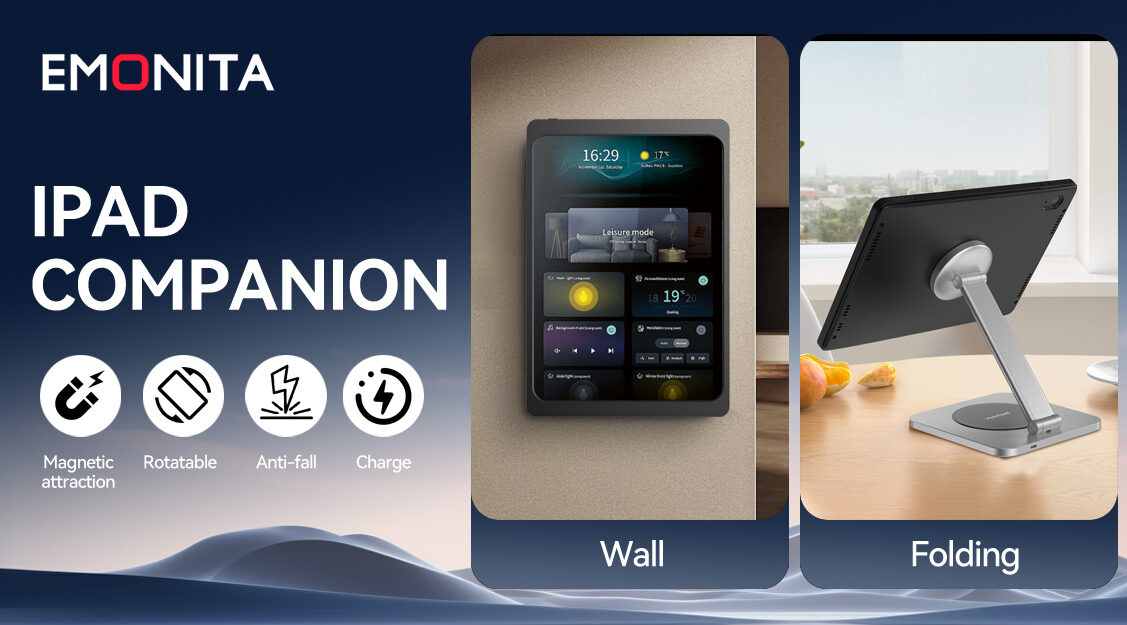
Good iPad charging tips aren’t just about getting to 100%—they’re about keeping your iPad ready every day, reducing cable mess, and avoiding those “low battery” moments during work, meetings, or family use. The best results come from consistent iPad charging habits and a clean routine you can repeat daily.
If you want a better daily experience, think in terms of a simple iPad charging setup: one main charging spot, tidy cables, stable power, and good airflow.
Tip 1: Choose One Main Charging Spot
The simplest iPad charging tip is also the most effective: give your iPad a “home base.”
- Desk charging spot for work and study
- Wall charging spot for dashboards and shared use
- Counter charging spot for check‑in or POS
When the iPad always returns to the same place, charging becomes automatic and your space stays tidier. These consistent iPad charging habits prevent last‑minute low‑battery problems.
Tip 2: Use a Reliable iPad Power Adapter and Cable
Unstable power causes slow charging, disconnects, and frustration. Use:
- A reliable iPad power adapter with enough wattage for your model
- A good-quality cable in good condition
- A clean outlet or stable power strip
This iPad charging tip matters even more if the iPad is used for always‑on dashboards or business displays, where interruptions look unprofessional.
Tip 3: Reduce Plug/Unplug Wear on the Port
Constant plugging and unplugging wears cables and can stress the device port over time.
If you charge multiple times a day, consider setups that reduce daily plugging, such as:
- Dock-style charging
- A consistent, fixed cable connection
- A dedicated stand or mount where the cable stays in place
Less handling often means more reliable charging long term—one of the most practical iPad charging tips for busy users.
Tip 4: Cable Management for iPad (Keep the Cable Path Clean)
A messy cable is a visual problem and a reliability problem. Good cable management for iPad:
- Avoids sharp bends
- Prevents accidental pulls
- Reduces cable damage over time
Even simple cable clips or a short cable channel can make your charging setup look cleaner and last longer. If you want a clean iPad setup, cable routing is one of the highest‑impact iPad charging tips you can apply.
Tip 5: Charge for Your Routine (Not Just Overnight)
Overnight charging works for many people, but it’s not the only method.
If your iPad is used heavily during the day, try:
- A short charge window during lunch
- A dedicated docking spot during work hours
- A “top-up” routine before meetings or school
The best iPad charging tips match real-life habits, not ideal schedules. A simple rule that works well: “Charge when you’re already stationary” (desk time, dinner time, bedtime).
Tip 6: Don’t Ignore Heat and Ventilation
Heat affects charging performance and long-term device health.
- Keep the iPad out of direct sunlight while charging
- Don’t cover it with thick fabric or trap it in a tight space
- Leave a little airflow around the device if it’s mounted or docked
If your iPad feels hot during charging, that’s your signal to improve ventilation. This is one of the most overlooked iPad charging tips, especially for wall-mounted dashboards.
Tip 7: Confirm Your iPad Model Before Buying Accessories
Buying the wrong accessory size is one of the most common mistakes, especially with cases, mounts, and frames.
Before you buy any new hardware, confirm your model first. Apple’s official guide is the fastest way:
https://support.apple.com/en-us/HT201471
This iPad charging tip saves time, returns, and frustration—particularly if you’re building a clean charging station with mounts or dock-style accessories.
Quick FAQ (Common Questions)
Do iPad charging tips change for wall-mounted iPads?
Yes—focus more on hidden wiring, stable power, and ventilation. Wall installs often run longer hours, so heat and cable routing matter more.
Is it OK to keep an iPad charging all day?
Many people do for dashboards and workstations. If you plan 24/7 use, prioritize stable power, good airflow, and an iPad charging setup that fits your needs.
What’s the easiest iPad charging tip to start with?
Pick one consistent charging location and fix your cable routing. Strong iPad charging habits start with a “home base” and clean cable management.
Helpful Links
Identify your iPad model (Apple):
https://support.apple.com/en-us/HT201471
Explore EMONITA iPad accessories and mounting solutions:
https://www.emonita.net/products/
Social Media and Contact
Follow EMONITA
Website
YouTube 1
YouTube 2
TikTok 1
TikTok 2
Facebook
Facebook Page
Facebook Business
Instagram
X (Twitter)
Contact
Tel/WhatsApp: +1 2244916232
WhatsApp / WeChat: +86 18959199691
Email: sales@emonita.net