Magnetic iPad Stand: 7 Secret Desk Benefits You’ll Love

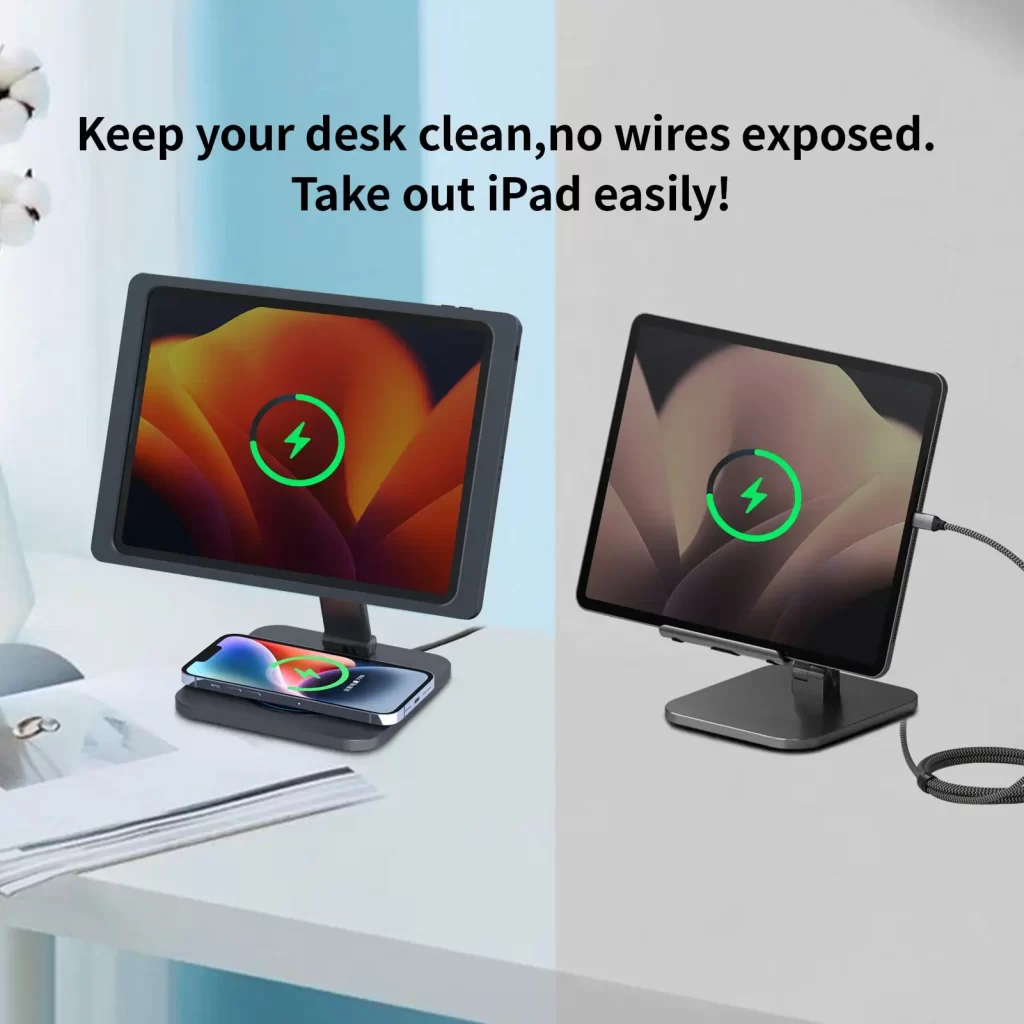
Magnetic iPad stand setups are quietly becoming the smartest way to lift an iPad off the table and turn it into a real desktop screen. The EMONITA Magnetic Stand with Case for iPad (18W, foldable L‑shape, 360° rotation, 180° tilt) is designed to do exactly that—give your iPad a stable home on your desk, keep it charged, and make every adjustment feel smooth and easy.
Instead of juggling a simple stand and a loose cable, this magnetic iPad stand combines a weighted base, a foldable L‑shaped arm, and a model‑specific charging case. You dock with a click, work comfortably, then lift to undock without touching a cable.
👉 Product page:
Magnetic iPad Stand with 18W Charging Case – EMONITA
👉 Explore other EMONITA stands and mounts:
EMONITA Product List
How the EMONITA Magnetic iPad Stand Works
At its core, the EMONITA magnetic iPad stand is a desktop dock that turns your tablet into something closer to a small, adjustable monitor.
The system includes:
- A model‑specific charging case with magnets and a charging board
- A foldable L‑shaped metal arm that holds the screen over the base
- A weighted aluminum alloy base with anti‑slip pads
- A rear USB‑C port that delivers up to 18W power to the iPad
Day to day, you:
- Snap your iPad into the EMONITA charging case.
- Bring it close to the arm until the magnets pull it into alignment.
- Feel a soft click as it docks and starts charging.
- Rotate and tilt to the angle you want.
- Lift the iPad off the magnetic iPad stand when you need to move.
It feels simple, but it solves a lot of tiny annoyances in one move.
7 Secret Desk Benefits You’ll Love
1. A Cleaner Desk Without Visible Charging Cables
The first secret benefit of this stand is how it hides the cable.
- The USB‑C port lives on the back of the base, not on the front or side.
- You plug it into a certified 18W+ USB‑C adapter, then forget about it.
- Power flows through the stand, into the case, and into the iPad.
From normal seating height, you see a neat stand and a floating screen—not a cable dangling from the tablet. Your desk looks calmer and your port sees less wear.
2. Portrait or Landscape in One Smooth Turn
Some apps love portrait; others need landscape. With this stand, switching between them is as easy as turning a page:
- 360° rotation lets you spin the iPad to any orientation.
- There’s no need to remove the tablet or re‑seat it.
- Rotation feels smooth and controlled, not loose or jerky.
That makes it simple to move from writing or browsing in portrait to watching a video or sketching in landscape, without losing your position on the desk.
3. Comfortable Tilt for Drawing, Reading, and Calls
Screen angle affects how comfortable your neck and shoulders feel. The EMONITA iPad stand offers up to 180° tilt, so you can:
- Drop the screen lower and closer for sketching, note‑taking, or editing.
- Set a mid‑angle for reading, browsing, and checking dashboards.
- Raise it higher for video calls and online meetings so the camera sits closer to eye level.
The hinge motion is tuned to be smooth and precise, so adjustments feel easy rather than stiff.
4. Dock with a Click, Undock Without Unplugging
The next secret benefit of this standis how it changes your daily routine.
- You don’t aim for a connector on the tablet.
- You don’t fight with a clamp or a spring arm.
- You simply bring the iPad (in its case) near the arm, and the magnets do the work.
When you’re ready to move away from the desk, you lift the iPad straight off. Because the cable connects to the stand—not the iPad—you never need to unplug anything at the device. The stand stays ready for the next session.
5. Stable Enough for Stylus Work and Fast Tapping
A floating design only works if the base is rock‑steady. This magnetic iPad stand is built around a:
- Weighted aluminum alloy base that anchors the setup
- Set of anti‑slip pads that grip your desk surface
- Classic L‑shaped arm that keeps the load centered
That means:
- You can draw with Apple Pencil without the iPad wobbling.
- Fast taps and swipes don’t send the stand sliding across the desk.
- The whole unit feels like a small, planted monitor rather than a loose accessory.
6. Folds Flat for Travel and Hot‑Desking
Even if your magnetic iPad stand earns a permanent place at home, it’s nice to know it can move.
- The L‑shaped arm folds down towards the base.
- The whole stand becomes slim and easy to slip into a backpack or laptop bag.
- Setup at a new desk takes only a few seconds.
For people who use shared offices, co‑working spaces, or client locations, this makes it easy to recreate a comfortable, familiar setup anywhere.
7. A Stand Tailored to Your Specific iPad
Many stands claim to be “universal,” but a true magnetic iPad stand benefits from a precise fit.
Every EMONITA kit includes a model‑specific charging case that matches your iPad. Options cover popular devices such as:
- iPad (A16 / 10th Gen)
- iPad 10.2″ (7th / 8th / 9th gen)
- iPad Air 11″ (M2 / M3)
- iPad Air 10.9″ (4th / 5th Gen)
- iPad Air 13″ (M2 / M3)
- iPad Pro 11″ (1st–4th gen)
- iPad Pro 11″ (M4 / M5)
- iPad Pro 12.9″ (3rd–6th gen)
- iPad Pro 13″ (M4 / M5)
- iPad mini (A17 Pro / mini 6)
The case keeps full access to cameras, buttons, speakers, and ports while lining up magnets and charging pads perfectly.
Not sure which iPad you have? Apple’s guide makes it easy to check:
Identify your iPad model (Apple)
Quick Setup and Daily Use
Setting up the EMONITA magnetic iPad stand is straightforward:
- Fit the case
Snap the model‑specific charging case onto your iPad. It clicks together quickly and doesn’t require tools. - Connect power
Route a USB‑C cable to the rear port on the base and plug it into a certified 18W+ USB‑C adapter. - Dock magnetically
Bring the iPad close to the arm. The magnets align and click it into place; charging begins automatically. - Adjust position
Rotate up to 360° and tilt up to 180° until your view feels comfortable. - Undock
When you’re done, lift the iPad off the stand. The stand and cable stay where they are, ready for next time.
Once you’ve done this a few times, docking and undocking becomes a natural part of your day.
Care, Safety, and Warranty
To keep your EMONITA magnetic iPad stand in great shape:
- Use a certified 18W or higher USB‑C adapter for consistent charging.
- Keep loose metal objects away from the magnetic surface when docking.
- Wipe the stand and case with a soft, dry cloth; avoid solvents and abrasive pads.
All EMONITA products, including this magnetic iPad stand, are covered by a 12‑month limited warranty.
For more iPad stands and accessories, visit:
EMONITA Product List
Watch the Magnetic iPad Stand in Action
Want to see how the magnetic iPad stand behaves on a real desk before you decide?
- YouTube preview:
- TikTok preview:
You’ll see how quickly the iPad snaps on, how tidy the cable routing looks from normal seating height, and how easily the stand rotates and tilts during actual use.